

The WordPress infection that rebuilds itself faster than you can delete it
Every so often a piece of malware crosses from "sophisticated" into "structurally hard to kill." This is one of those. It doesn't just infect WordPress sites — it engineers its own survival at every layer of the stack: the filesystem, the database, WP-Cron, the active theme, the browser, and even the relationship between sibling sites on the same host.
Our team has been tracking a campaign that has already reached a scale large enough to call an ecosystem-wide event. What follows is a breakdown of how it works, why standard cleanup steps keep failing against it, and the order of operations that actually removes it for good.
How it gets a foothold
The payload is written to load as a WordPress plugin or, preferably, as a wp-content/mu-plugins/ file — "must-use" plugins load automatically, ignore the Plugins screen's activation state, and are far less likely to be reviewed by an admin. The code checks for a defined ABSPATH constant and exits immediately outside of a WordPress context, which is a basic anti-analysis guard as much as a compatibility check.
The source itself is obfuscated: strings live in a scrambled table and are decoded at runtime through a custom character-set map (we've observed the map key a18xgj672mowjoum reused across samples). Deobfuscating the file doesn't remove that machinery — it just exposes the logic underneath, which is what the rest of this post describes. It's also why signature scanning alone struggles here: the malicious strings simply don't exist on disk in a matchable form until the decode routine runs. This is precisely the gap runtime-layer protection like Monarx ThreatShield is built to close — it inspects requests inside the live PHP execution context, so it sees what the code actually does once decoded rather than how the file looks at rest.
On load, the plugin fingerprints itself — basename and version — into a hashed option, and looks for competing copies of itself sharing a watermark: filemtime % 100000 === 93819. Older or duplicate copies get deleted. If the running copy isn't already living in mu-plugins/, it schedules a move for the shutdown hook: copy itself in, delete the old file, and strip its own entry from active_plugins so it disappears from the normal plugin lifecycle entirely.
Command-and-control over Ethereum
The most unusual design choice in this family is its C2 channel. Instead of a hardcoded domain or IP, the malware resolves command-and-control by calling eth_call (method selector 0x3bc5de30) against hardcoded smart contract addresses over public Ethereum RPC endpoints. The contract's response yields an XOR key and a list of C2 URLs.
Why this matters for defenders
Blockchain-resolved C2 is takedown-resistant by design — there's no registrar to suspend and no single IP to null-route. It also blends into infrastructure that most WAFs and outbound-traffic monitors don't treat as suspicious, since the "C2 lookup" is indistinguishable from a normal JSON-RPC call to a public Ethereum node.
Roughly every ten hours (via a scheduled event we've seen registered as sc_cron_fetch, and again opportunistically on page-request shutdown), the implant beacons out and exfiltrates a startling amount of context in one shot: the domain, plugin version, and ABSPATH; the full list of active plugins and MU-plugins; the login URL; the site's admin list along with forged authentication cookies good for 14-day sessions; and any stored error state from prior runs.
In exchange, it can receive — encrypted — an updated copy of its own PHP, new "plugin rules" or "inject rules," JavaScript/service-worker payloads, and fresh templates for each of its secondary persistence mechanisms (guard, advanced-cache/object-cache, db, theme, htaccess, userIni, installer). This is not a static dropper. It's a platform that can push new persistence logic to every infected site whenever one of its mechanisms gets patched around.
Nine ways to come back from the dead
This is the core engineering problem for defenders: the malware doesn't rely on one persistence mechanism, it runs several in parallel, and each one is capable of restoring the others. Removing the "main" file does nothing if six other copies are watching for exactly that.
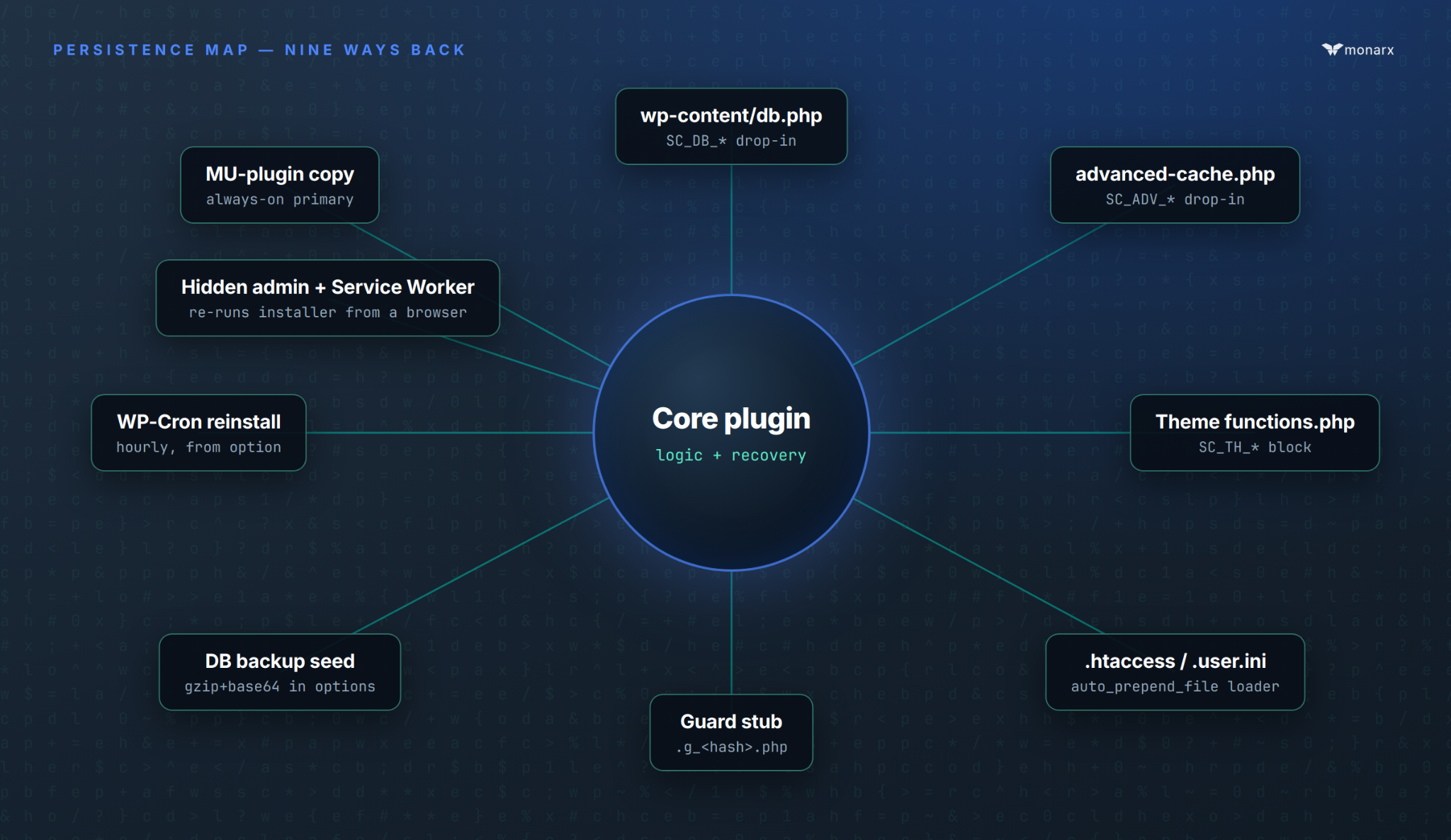
Figure 1. Nine independent mechanisms can restore the primary plugin. Removing one — even the "main" file — leaves the other eight watching for exactly that.
Each of these copies runs its own health check. A file-recovery routine restores the plugin from a src option if the on-disk file shrinks below its expected size — a detail worth sitting with, because it means a partially-successful deletion (or a file manager that quarantines instead of fully removing a file) can trigger reinfection just as reliably as leaving the file untouched. We've seen this firsthand: in one case a 10MB copy of the primary malicious file was flagged as malicious and "removed" through a file manager, but the underlying file was still alive on disk — whether due to its size or a delay in the deletion actually completing — and the whole infection cycle simply started over from that surviving copy.
The malware also back-dates its files with touch() calls to match the modification times of nearby legitimate WordPress core files, specifically to defeat "sort by newest" triage during incident response.
This is the failure mode a server-side agent has to be built for specifically: killing a malicious process is not enough if a sibling copy respawns it, and deleting a file is not enough if the deletion itself doesn't fully land. Monarx Agent, our core antivirus module, remediates in memory and in-process — not just on disk — precisely so a killed process can't simply respawn from a surviving copy, and it re-checks its own remediation over time so a file that "comes back" gets removed again automatically rather than waiting for the next manual scan.
Where it hides its state
Persistence isn't only about files. The plugin keeps a shadow copy of itself and its configuration inside wp_options, and many of the option names are themselves obfuscated using a simple, consistent formula:
Observed hashing scheme
substr( md5( realpath(ABSPATH) . '93819' . '<keyword>' ), 0, 12 )
That means the literal option name differs per installation, but the derivation is fixed — useful for anyone writing a scanner, since you can compute the expected option name for a given site path rather than pattern-matching on a random 12-character string.
A hidden administrator, built to blend in
Alongside file persistence, the malware creates a rogue WordPress administrator with a randomized username (patterns we've observed include admin_*, adm_*, administrator_*, and backup_* followed by 6–10 hex characters) and a randomized password, storing both in the bu / bp options rather than in wp_users in plaintext form anywhere obvious. The account's email is set to <username>@<site-domain>, which passes a casual glance since it matches the site's own domain.
The account is then actively hidden: a pre_user_query filter strips it out of the Users screen query, and the same stealth logic extends to the REST API and Site Health checks. New-user notification emails are suppressed so the real site owner never gets the "new administrator registered" alert that would normally flag this immediately. A dedicated WP-Cron job — registered under a randomized hook name — re-creates the hidden admin on a schedule in case it's ever deleted.
Credential theft runs on two tracks simultaneously. Server-side, the plugin hooks authenticate to capture every successful admin login and store the username/password pair in the ic option, and it has also been observed running raw SQL directly against wp_users and wp_usermeta to bulk-collect account data outside of the normal WordPress API. Both the harvested passwords and the forged 14-day session cookies sent back through the C2 channel mean that even a fully "clean" reinstall of WordPress core can be walked right back in through a legitimate-looking admin login — which is why credential rotation is not optional during cleanup. Raw SQL run outside the normal WordPress API, and a plugin reinstall driven by an automated _wpnonce fetch instead of a human click, are both exactly the kind of runtime behavior ThreatShield is designed to flag and terminate before the request completes — regardless of how the payload that triggered it was obfuscated.
The part that survives after the server is clean
This is the mechanism our researchers flagged as the most interesting, and it's the one that most cleanup guides miss entirely, because it doesn't live on the server at all.
The malware registers a malicious Service Worker, but only on wp-admin and wp-login.php — never for ordinary site visitors, which keeps it off the radar of anyone monitoring front-end traffic or running a normal malware scanner against public pages. Once registered in an administrator's browser, it does three things:
- Credential interception. It intercepts every POST request to
wp-login.phpand captures the submitted username and password from any user who logs in on that browser — before the credentials even finish their normal round trip. - Autonomous reinstallation. Using the currently logged-in administrator's active session, it automates the standard Upload Plugin → Install Now workflow end-to-end, including fetching a valid
_wpnonce— meaning it can reinstall the malicious plugin as if the admin had clicked through it themselves, with no server-side vulnerability required at that point. - Background Sync persistence. It registers for Background Sync, which lets it perform periodic check-ins and reinstall attempts even when no browser tab for the site is open — a capability normally reserved for progressive web apps trying to sync legitimately, repurposed here to survive well past a page reload or closed tab.
Why standard cleanup fails against this
A team can wipe every malicious file, purge every option, and reset every password on the server — and still get reinfected within hours, because the browser of every admin who logged in during the infection is still running a Service Worker that will happily reinstall the plugin the next time that admin opens wp-admin. The fix has to include telling every admin to manually unregister the Service Worker and clear site data from their browser's DevTools, on every device they've used to log in.
It doesn't stay on one site (cross-site contamination)
On shared hosting or any multi-site filesystem, the malware walks sibling WordPress installations on the same host and drops the same MU-plugin into each one — or, where MU-plugins aren't viable, installs itself as a normal plugin and flips the relevant entry in active_plugins. A single compromised account on shared hosting can therefore reinfect a dozen otherwise-unrelated sites that happen to live on the same server, which is a major reason this has become an ecosystem-scale event rather than a contained one.
Indicators of compromise
The following is aggregated from active investigations and is meant for security engineers, SOC analysts, sysadmins, and malware hunters triaging suspected sites. None of these are single-signal proof on their own — this family is deliberately built to look unremarkable in isolation — but two or more together on the same site are a strong positive.
File and path indicators
Database and scheduled-task indicators
Hashed option name formula
substr( md5( realpath(ABSPATH) . '93819' . '<keyword>' ), 0, 12 )
Account and session indicators
- Administrator usernames matching
^(admin_|adm_|administrator_|backup_)[a-f0-9]{6,10}$ - An administrator account whose email is
<username>@<site-domain>— matches the site's own domain rather than an external address - An admin account with no corresponding "new user registered" notification ever sent
- An admin account absent from the Users screen and REST API but present in a direct
wp_usersquery - Active sessions with ~14-day expiries that don't correspond to a real login event
Network and behavioral indicators
- Outbound HTTPS/JSON-RPC calls from the web server user (
www-data,nobody, or the site's PHP-FPM pool user) to public Ethereum RPC endpoints — specificallyeth_callrequests carrying method selector0x3bc5de30 - A recurring outbound beacon roughly every 10 hours from the same PHP-FPM pool, independent of real visitor traffic
- A Service Worker registration whose scope is limited to
/wp-admin/or/wp-login.php— visible per-browser under DevTools → Application → Service Workers - Plugin header
Name:fields resembling generic, slightly-too-professional names (we've observed variations resembling "Rapid Worker Evo") - Raw
SELECTstatements againstwp_users/wp_usermetaoriginating outside normal WordPress core or known-plugin code paths, visible in slow-query or database audit logs
These indicators feed directly into what Monarx Agent hunts for across managed infrastructure — if you're triaging this by hand across more than a handful of sites, that's usually the point where automated detection pays for itself.
Cleanup: the order of operations that actually works
Every step below exists because skipping it — or doing them out of order — is exactly what leads to the reinfection loop described above. The single most important rule: don't delete the primary loader while PHP is still executing for that site. If the recovery logic in the surviving copies is still live, deleting only the MU-plugin is what triggers instant recovery, not what stops it.
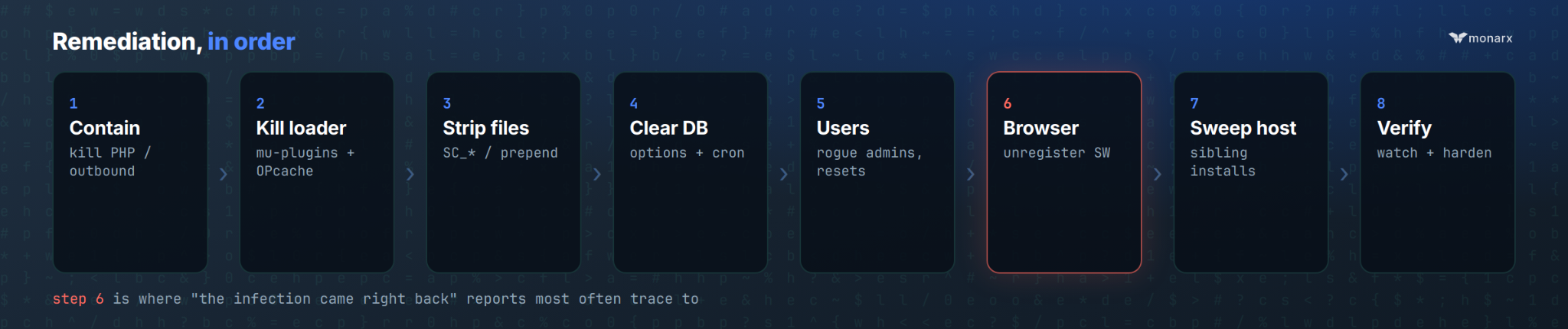
Figure 2. The eight-phase remediation sequence. Step 6 — clearing the Service Worker from every admin's browser — is the step that "the infection came right back" reports most often trace to.
- Contain first. Put the site in maintenance mode or disable PHP for the vhost, or at minimum block outbound HTTPS from the web user. Rotate hosting/panel passwords and treat every existing WordPress admin session as burned. Snapshot the filesystem and database before any mass deletion, for forensics.
- Kill the always-on loader. Delete large PHP files (especially anything over roughly 5KB, and definitely anything over 1MB) under every
wp-content/mu-plugins/directory, remove any fake plugin directories matching the implant's basename, strip the entry fromactive_plugins/active_sitewide_plugins, and restart PHP-FPM / clear OPcache so a cached copy of the old code can't keep running. - Strip secondary file persistence. Remove the
SC_DB_*,SC_ADV_*, andSC_TH_*blocks fromdb.php,advanced-cache.php, and the active theme'sfunctions.phprespectively (or delete the file outright if it's entirely malicious). Removeauto_prepend_filedirectives from both root andwp-content.htaccessand.user.inifiles. Delete hashed droppers and guard stubs (.g_*.php) underwp-includes/,wp-content/, and cache directories, and grep the whole tree forSC_DB_,SC_ADV_,SC_TH_,auto_prepend_file, andsc_payloadto catch anything missed. - Clear the database. Delete every option and transient matching the known names and prefixes (see the table above), clear the WP-Cron rows for
sc_cron_fetchand the hourly reinstall hook, and — because option names are frequently hashed per-site using theABSPATH-derived formula — search for hashed 8–12 character option keys holding gzip/base64 blobs rather than relying on exact-name matches alone. - Clean up users and sessions. Find and delete admin accounts matching randomized patterns like
admin_*,adm_*, or an email oflogin@<sitedomain>, and review every other admin account for anything unexpected. Truncate session tokens / force a logout for everyone, and force a password reset for all legitimate users — credentials were very likely harvested and cookies were very likely forged. - Don't forget the browser. Instruct every admin who has logged into the site during the suspected infection window to open DevTools → Application → Service Workers, unregister any worker for the domain, and clear site data. Invalidate any CDN or page cache that might still be serving HTML with the malicious Service Worker registration script embedded.
- Sweep the whole host. Check every WordPress installation on the same account or server for the same MU-plugin, markers, or file-mtime watermark — this family spreads sideways on shared filesystems. Also look for whatever got the site in initially: nulled plugins, exposed file managers, and similar entry points.
- Verify and harden. Re-enable PHP and watch closely for the malicious files to reappear within minutes — if they do, a dropper or a database backup option was missed. Once you're confident it's gone, patch WordPress core, plugins, and themes; remove unused file-manager plugins; consider
DISALLOW_FILE_MODStemporarily; restrict write access tomu-plugins/; and only then rotate database credentials and the authentication keys/salts inwp-config.php, so you're not rotating secrets the malware can immediately re-harvest.
A caution from the field
If any single copy of the primary payload survives — quarantined-but-not-deleted, delayed by a slow file operation, or simply missed because of its size — the entire infection can regenerate from that one file. We've seen a 10MB copy flagged as malicious sit "removed" in a file manager while the underlying file was still live on disk. Confirm deletion at the filesystem level, not just in a management UI, and re-scan after every mass removal before declaring a site clean.
Run correctly, that eight-step sequence works. It's also eight steps, across potentially every site on a shared host, that someone has to execute correctly under time pressure — which is exactly the scenario our WordPress Cleanup Service exists for. It's a white-glove, human-led remediation service our threat research team runs on behalf of hosting partners: removing the malware, cleaning the database, pulling the hidden admin, and clearing out malicious plugins and themes, then handing back a completion report — instead of a support team learning this playbook mid-incident.
How Monarx addresses this campaign end-to-end
The reason this family is so disruptive is that it attacks at three different layers — the filesystem/database, the live PHP request, and the browser — and most tooling only covers one of those. Our platform is built around exactly that gap, with a module for each layer:
The takeaway
What makes this campaign notable isn't any single technique — hidden admins, cron-based reinstallation, and drop-in persistence files have all shown up in WordPress malware before. It's the combination: redundant file-level persistence that self-heals, database-level state that survives file deletion, a takedown-resistant C2 channel, and a client-side foothold that outlives the server-side cleanup entirely. Any one of those alone is a bad day. Together, they're why "we cleaned it and it came back" has become such a common story across the WordPress ecosystem this cycle.
Treat the checklist above as a minimum, run it in order, and don't skip the browser step — it's the one that turns a successful cleanup into a permanent one.
Seeing this on sites you manage?
Monarx researchers are actively tracking this campaign's infrastructure and payload updates. If you're finding these indicators on the hosting infrastructure you operate, we'd like to hear about it — and if you'd rather have it handled end-to-end, our team can walk you through Monarx Agent, ThreatShield, and the Cleanup Service.

Ready for next‑gen AI Server Security?
Start your Monarx journey in minutes