

Warning: Sophisticated "Self-Healing" WordPress Malware Campaign Actively Targeting Sites via fake wp-cron
If you run a WordPress website, stop what you are doing. Elkins from our Threat Research Team uncovered a highly sophisticated, multi-component malware campaign actively compromising WordPress installations. Unlike standard website infections, this threat is purpose-built to survive almost all traditional cleanup attempts. If you delete one malicious file, it reappears minutes later. Here is a breakdown of how this coordinated attack operates, how to detect it, and the precise order of operations required to completely eradicate it.
What Makes This Attack Different?
Most WordPress malware is relatively simple: an attacker drops a backdoor file, a security scanner flags it, you delete it, and the problem is solved. This campaign is fundamentally different. It operates as a coordinated ecosystem of four distinct components that constantly monitor, protect, and restore one another. It is not the work of opportunistic script kiddies. It was engineered by threat actors who possess a deep, granular understanding of WordPress internals.
How the Infection Works: The 4-Part Ecosystem
The malware achieves its near-immortality by splitting its workload across four moving parts.
1. The Entry Point
The attack begins at the front door inside WordPress's root index.php file, which executes on every single page request. The malicious code masquerades as a legitimate WordPress cron helper, complete with realistic function names and comments. On every page load, it silently beacons out to an attacker-controlled server, exfiltrating server paths, IP addresses, and hostnames while waiting for commands like injecting spam or writing new files. It uses hex-encoded strings and AES-128-ECB decryption to hide its configuration from pattern-based scanners. Furthermore, it only fully activates when specific cookies or user-agents are present, making it completely invisible to casual visitors and site owners.
2. The Background Worker
Once established, the entry point drops a long-lived background script onto your server. This worker performs two highly damaging, automated tasks. First, it silently creates a rogue WordPress administrator account with a hardcoded username, granting it Super-Admin privileges on multisite networks. Second, it tampers with wp-config.php to disable caching and security constants, then forces a flush of popular caching plugins like WP Rocket, LiteSpeed Cache, and W3 Total Cache to ensure its malicious content is always served live. To protect itself, it programmatically scans for and deletes a hardcoded list of popular security plugins.
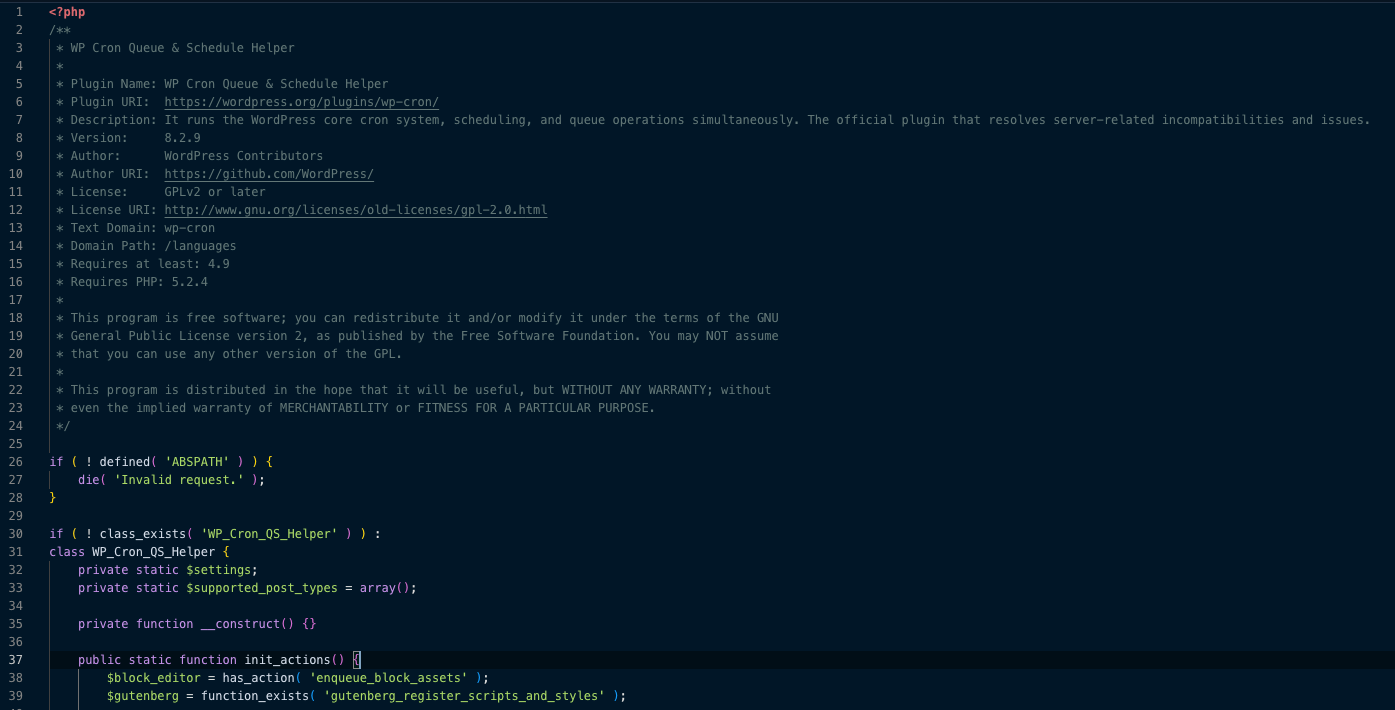
3. The Fake Plugin: wp-cron
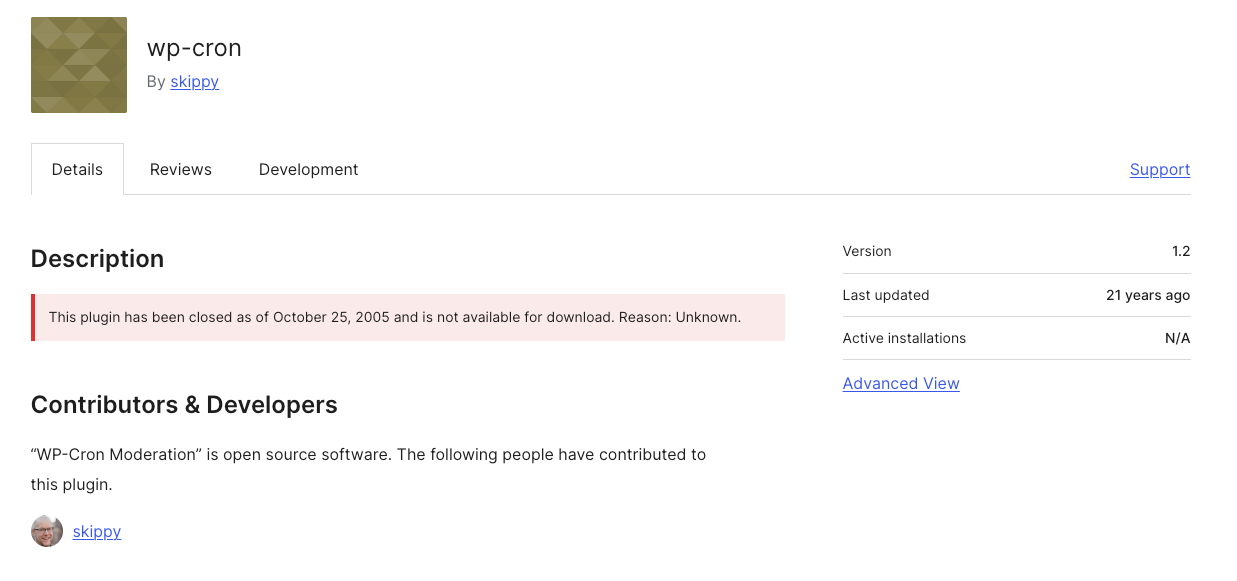
The malware drops a fake plugin into wp-content/plugins/wp-cron/. To evade suspicion, it heavily copies real code, UI layouts, and hooks from the legitimate Classic Editor plugin, claiming authorship by "WordPress Contributors." As we can review in the WordPress repository, the wp-cron plugin was closed 21 years ago. And it reached version 1.2, unlike the fake plugin which uses version 8.2.9.
On every page load, it grabs malicious payloads like spam links, phishing scripts, or invisible SEO manipulation from the attacker's server and injects them directly into your site's HTML. By presenting a specific cryptographic cookie, attackers can bypass WordPress's authentication entirely and log in as any administrator, leaving zero traces in the standard login logs. The plugin uses injected CSS and JavaScript to completely hide itself from the WordPress Admin Plugins screen, and it even hooks into the all_plugins filter so that other management tools cannot see it programmatically.
4. The Integrity Checker and Re-Infection Engine
This fourth component, usually dropped as a file like wp-settings-opml.php, is the reason traditional cleanups fail.
⚠️ The 6-Minute Re-Infection Loop
Every six minutes, this script wakes up, contacts the attacker's server, and fetches the expected MD5 file hashes for the other three malware components. If it detects that you have modified or deleted any of those files, it instantly re-downloads and overwrites them.
The Command-and-Control (C2) Core
All four components rely on a single malicious domain to function, which is apis[.]raghild[.]com. This domain serves as the central nervous system for the campaign. It handles exfiltrated data, sends down real-time injection payloads, and hosts the clean copies of the malware used by the re-infection engine. Cutting off communication to this domain is the single most critical step in saving your site.
This domain was recently registered in Namecheap and is currently leveraging Cloudflare for protection.
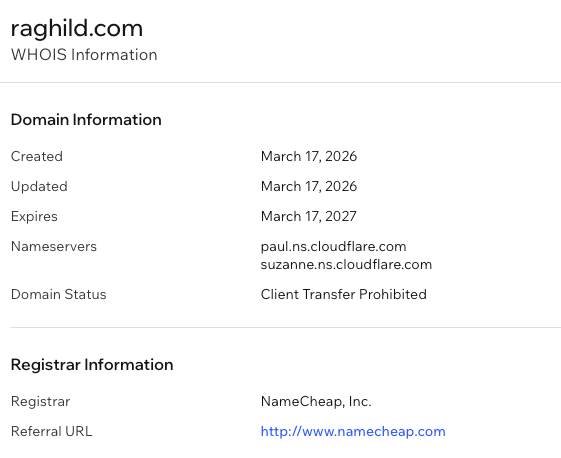
Monarx has submitted an abuse report to both Namecheap and Cloudflare for taking down this malicious C2 server.
Signs Your Site Is Infected
Look for the following technical indicators of compromise throughout your environment.
- Your
index.phporwp-blog-header.phpfiles may be significantly larger than normal or show recent, unexplained modification dates. - An administrator account named
wordpress_cli_corewith the emailwordpress@cli[.]wordpress[.]orgmay exist in your database. - Server logs might show frequent outbound HTTP requests to the malicious C2 domain.
- The server's temporary directory often contains lockfiles matching the patterns
wp_cli_*.lockorwpqs-*.lock. - Finally, look for unexplained entries in your
wp_optionstable nameddefault_cron_scheduledordefault_commment_page_format.
The Precise Order of Operations for Cleanup
Because of the self-healing integrity checker, partial or out-of-order cleanup will fail. You must follow this exact sequence to achieve full eradication.
- Block the C2 domain by cutting off all outbound traffic to
apis[.]raghild[.]comvia your server firewall or DNS. This kills the re-infection engine's ability to download replacement files. - Take the site completely offline to stop the loop from attempting alternative routing and to protect your visitors.
- Nuke the rogue admin by deleting the
wordpress_cli_coreuser directly via the database or WP-CLI, as you should not trust the compromised Admin UI. - Replace core files by deleting and replacing all core WordPress files, including
index.php,wp-blog-header.php, and the entire/wp-includes/directory, with fresh copies from WordPress.org. - Purge plugins and uploads by deleting the entire
wp-content/plugins/wp-cron/directory, then manually inspect your active themes and uploads for files matching the patternwp_mu_network_*. - Rotate all credentials including database passwords, SSH/FTP access, hosting panel logins, and admin passwords, while making sure to regenerate your WordPress security keys and salts in
wp-config.php. - Complete a database scrub to delete the malicious
wp_optionsentries and ensure theactive_pluginsarray doesn't hiddenly call the malware.
As an alternative, if you have a verified, clean backup from before the infection date, restoring it and immediately rotating all credentials is the safest route.
How to Protect Your Site Going Forward
To ensure your site doesn't fall victim to this or future advanced campaigns, implement these hardening steps immediately. Keeping everything updated is your first line of defense, as the vast majority of these entry points rely on known vulnerabilities in outdated plugins and themes. Next, modify your server configuration via .htaccess or Nginx rules to block PHP execution inside the wp-content/uploads/ directory. You should also enforce file integrity monitoring by using server-side tools or managed security platforms that alert you the second a core WordPress file is modified. Finally, deploy a robust Web Application Firewall to block malicious traffic and exploit attempts before they ever reach your WordPress installation.
The Bottom Line
This campaign represents a major step forward in malware sophistication targeting everyday websites. Its automated self-healing, clever cloaking, and seamless backdoors prove that website security can no longer be treated as a set-it-and-forget-it task.
If you manage WordPress sites professionally, take the time today to audit your server logs for connections to apis[.]raghild[.]com. If you are a site owner noticing any of the warning signs listed above, do not hesitate to reach out to a professional forensic security service.
This technical brief is based on forensic analysis of malicious PHP files recovered from actively compromised environments.

Ready for next‑gen AI Server Security?
Start your Monarx journey in minutes