

From Phone Calls to AI Prompts: How Shared Hosting Customers Talk About Malware Now
A little about me
My name is Salvador and I'm from the Threat Research team here at Monarx. Technical support is part of my DNA. I started with Linux, moved to desktop support in the call center world, then to VoIP, and eventually came back to the web. Helping family and friends with their computers came so naturally that I began doing it for companies.
That path took me to several hosting companies and to Sucuri, where I spent my days fighting malware. Later I moved on to launch a malware team from scratch: building the tooling, writing the SOPs and training the Security Engineers & Support Engineers who would run it.
The way shared hosting customers ask for help with malware has changed more in the last two years than in the decade before it. I have spent most of my career on the receiving end of those requests, first answering them, then leading the team that handled them, and now helping hosting partners deal with them at scale.
This is not a research paper. It is a reflection built from my own experience and from long conversations with friends and partners who still sit in support queues at hosting companies around the world. We all noticed the same shift, and I think it is worth putting into words.
From the phone line to the prompt window
Every support channel brought a different kind of customer, and a different kind of conversation about malware.
- Phone. In the early days, customers called. Most of them were small business owners or hobbyists who barely knew what FTP was. They described symptoms, not causes: "my site shows a strange page" or "Google says I'm dangerous." The agent on the line did the translating, and the customer trusted whatever we said next.
- Tickets. Ticketing systems slowed things down and made them more precise. Customers started pasting error messages, screenshots and sometimes a suspicious file name. They still relied on us to explain what was happening, but they now had a written record and expected a written answer.
- Live chat. Chat made support feel instant. Customers multitasked while talking to us, often with a tutorial open in another tab. They knew enough to ask "is it a hacked plugin?" but not enough to judge the answer. Expectations about speed went up sharply.
- Social media. Then complaints went public. A site flagged for malware could become a post tagging the hosting company within minutes. Support turned partly into reputation management, and customers learned that a public post often got a faster reply than a ticket.
- AI. Today, many customers arrive having already asked an AI assistant. They come with a diagnosis, a vocabulary they did not have last year, and a message the assistant drafted for them. The technical language has improved overnight. The understanding behind it has not always kept up.
When AI writes the malware support ticket
The pattern is now familiar to every support lead I talk to. A customer notices something odd on their site, pastes a few files or a scan result into an AI tool, and asks it what to do. The tool produces a confident analysis and a polished email to send to the hosting company.
That email usually reads well. What it lacks is context. The assistant does not know which plan the customer is on, what the hosting company actually includes, or what the terms of service say about security and support scope. It cannot see the server, the logs, or the account history. So it asks for everything.
Support agents then have to unpack a long, technical-sounding request, figure out what the customer really needs, and explain politely that half of it is outside the service. Several friends in support told me the same thing: these tickets take longer to answer than the old "my site is hacked, please help" ones, because the agent has to correct the framing before they can fix the problem.
The volume adds up. When writing a detailed request costs the customer ten seconds, the number of detailed requests grows, and the pressure lands on the same teams that were already stretched.
“Please send me the RCA”: beyond malware cleanup
The clearest sign of this shift is what customers ask for. A few years ago, a shared hosting customer wanted their site cleaned and back online. Today, more and more of them ask for a root cause analysis, a forensics report, a timeline of the attack, or the exact vulnerability that was exploited.
Those are reasonable questions. Anyone who has been hacked wants to know how it happened so it does not happen again. The problem is that most malware cleaning services were never built to answer them.
Historically, malware services in shared hosting focus on post-exploitation remediation. They detect infected files, clean or quarantine them, and restore the site. That is valuable work, and it is what most plans include. But it starts after the attacker is already in. It removes the damage without explaining the door.
So a gap opens between what the customer now expects and what the hosting company actually offers. That gap is where the friction lives: frustrated customers, escalated tickets, and agents who know the answer the customer wants is not something they can produce.
Why forensics has always been the hard part
Real forensics is slow, manual work. An investigator gathers every log the server still has: web access logs, error logs, FTP and SSH logs, control panel activity, file modification times. Then they work backwards from the infected file, trying to find the first request that touched it, the IP behind that request, and the vulnerable script or credential that let it in.
On a shared server, that means sifting through traffic from hundreds or thousands of sites at once. Logs rotate and disappear. Attackers clean up after themselves, change timestamps and hide behind rotating IPs. A single investigation can take hours or days, and it often ends with "most likely" rather than "certainly."
That is why hosting companies have rarely offered forensics on shared plans. It does not fit the price point, it does not scale with the number of accounts, and most support teams do not have dedicated investigators.
Now AI-drafted requests ask for exactly this work, on every incident, as if it were standard. Hosting companies are pushed against the wall. They can say no and frustrate the customer, or say yes and take on work they lack the capacity, tooling or contract to deliver.
Why I joined Monarx
Before Monarx, I ran the malware team at a hosting company. I knew the forensics problem from the inside. I knew what it felt like to tell a customer we had cleaned their site but could not tell them how the attacker got in. I knew the long nights spent grepping logs to answer one escalated ticket.
We relied on an in-house scanner, built like most tools of its generation on regex patterns and YARA rules. It caught what we had already seen, needed constant rule updates, and ran on a schedule. Between scans, an infection could sit quietly on a server. I started looking for alternatives.
One of them was Monarx. I signed up for a free trial, installed it on my personal VPS, and uploaded malware samples to see how it would react.
I was honestly blown away. It reacted without me launching a scan, and the backtrace showed exactly how each file had arrived. The platform was agile, the feature set was deep, and it felt light years ahead of the regex and YARA based remediation I had worked with for years.
That trial changed what I wanted to work on. Instead of protecting the customers of one hosting company, I joined Monarx eager to help protect a much wider audience.
How Backtrace shows where malware came from
Backtrace is what sets Monarx apart from other malware services in shared hosting. Instead of only cleaning up after an attack, it records how the attack happened, as it happens.
It relies on two Monarx services working together:
- Antivirus, powered by the Monarx Agent installed on the server. It watches file activity and behavior, and captures the fingerprints of malicious files.
- ThreatShield, our Zend PHP extension. It reviews every request that reaches PHP, so it sees the request that writes or runs malicious code, along with the IP that sent it.
Together they review behavior, capture fingerprints and stop infections. When malware appears, Backtrace connects the infected file to the request that created it. That shows how the malware initially entered the website or server.
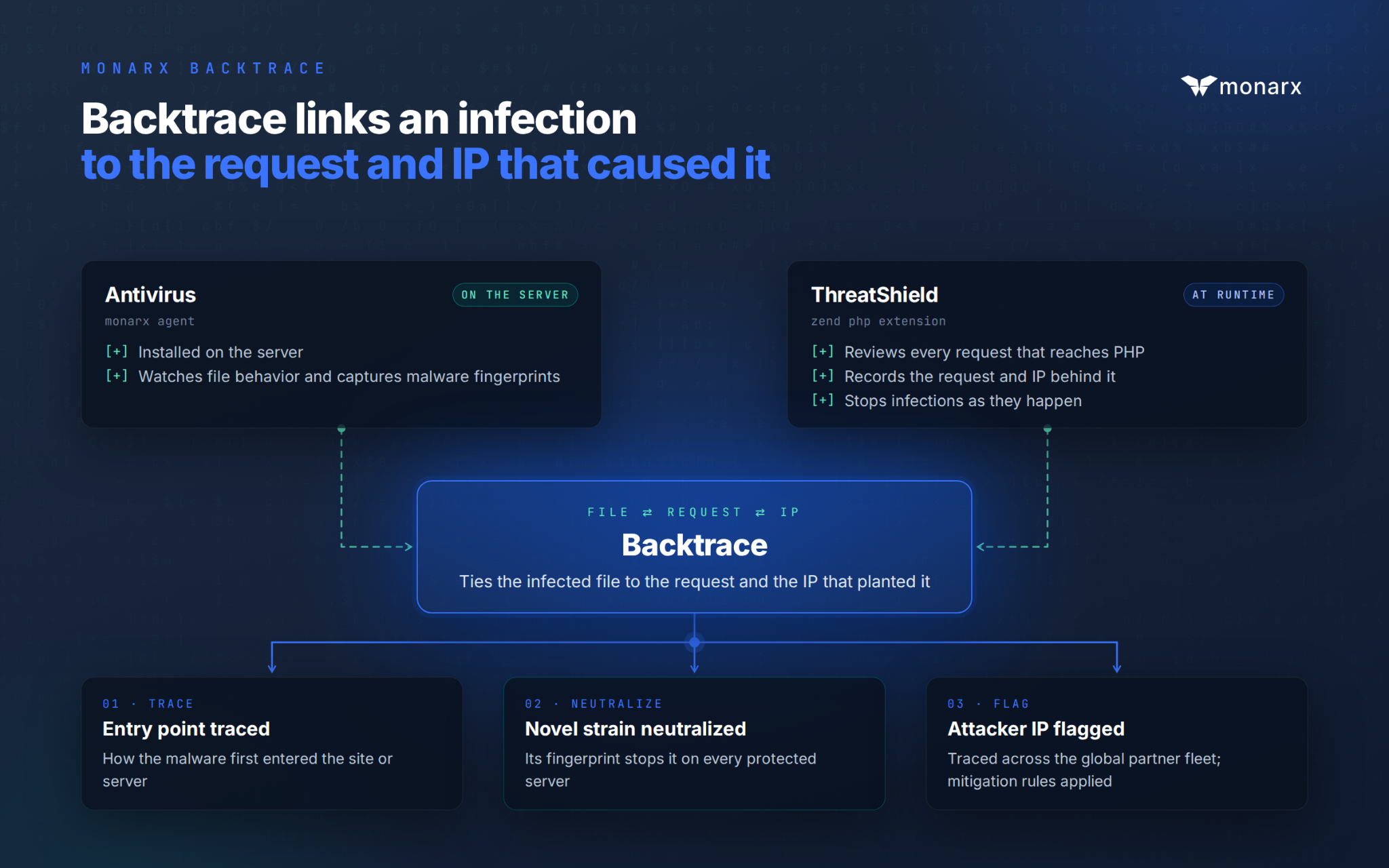
Because Monarx runs across a global fleet of hosting partners, that knowledge does not stay on one server. The bad actor's IP can be traced across the entire fleet and marked as malicious, so mitigation rules apply everywhere. A novel strain seen once can be neutralized everywhere it tries next.
For a support agent, this turns a forensics request into a lookup. The entry point, the attacker IP and the malicious file are already on record, without days of manual log review.
Always on, and easy for partners to build on
Monarx works the way the antivirus on your computer does. There are no scheduled scans to configure and no window where an infection waits for the next run. It is always running, always scanning and always protecting customers.
That changes the support model. Support staff no longer need to manually scan accounts and run tools to remove malware, because detection and remediation happen continuously in the background.
Hosting partners can then bring that information to their customers through the Monarx API and white label options. It is easy to integrate: partners pull malware data, including backtrace details, into their own control panel, customer portal or support tools, under their own brand. Customers see what was found and what was done about it, without opening a ticket. When they ask "how did this happen?", the answer is already there.
What this means for hosts and their customers
Customers are not going to stop using AI, and they are not going to stop asking how they got hacked. Nor should they. The question is whether hosting companies keep answering those requests with manual log reviews and apologies, or with data they already have.
With backtrace, a support agent can answer "how did this happen?" with evidence instead of a best guess, and a customer gets the explanation they were looking for. The friction that AI-generated requests created becomes a chance to show real value.
That is the work I came to Monarx to do. After years on the other side of the queue, I still find it rewarding to help support teams close tickets with answers instead of excuses. I still love to help (everyday) to protect the web.

Ready for next‑gen AI Server Security?
Start your Monarx journey in minutes