

RZX Multi-Tool: Automating Infections to WordPress Websites
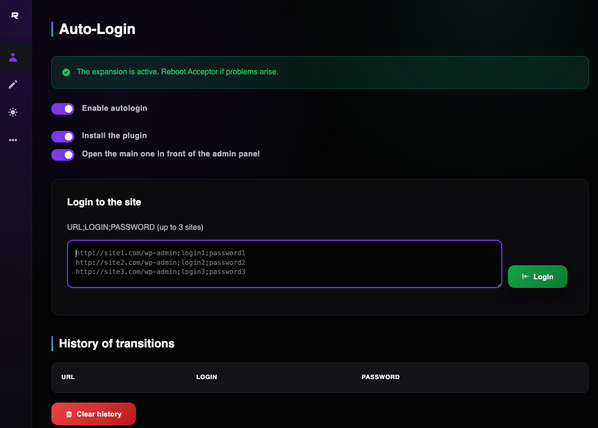
We usually find interesting and novel stuff when performing our daily Threat Research tasks at Monarx. Today, I want to share an interesting toolkit that was deployed to a victim; this toolkit is being used to login to WordPress sites and automatically install a malicious plugin that the toolkit contains.
What is the RZX Multi-Tool?
The RZX Multi-Tool (often part of the larger RZX-AIO or RZX-Project) has indeed expanded its reach beyond Discord and Roblox. While its roots are in account stealing, the newer iterations now include a specialized WordPress module designed for mass automated attacks.
This newer version is essentially an "Auto-Exploiter" toolkit. Here is what the WordPress-specific functionality typically includes:
WordPress Features
- SEO SPAM injection: The toolkit includes files to inject SEO in different text blocks of the website such as the homepage, header or footer. This variation observed is focusing on CASINO SEO SPAM. It connects to
march03252[.]comto retrieve the content. - Injection to functions.php: It also injects some malicious code into the website active theme
functions.php. The code hides all spammy posts from the site owner, modifies the post count and excludes all the created posts from the WordPress built-in search function. - Malicious Plugin Uploader: The toolkit uploads a malicious zip file named
wp-core-tools.zipand activates it as a regular plugin. - Config & Database Grabber: A specific feature meant to steal the
wp-config.phpfile, which contains the database credentials, and then injects thousands of posts into the website database.
What does the wp-core-tools plugin do anyways?
- File Manager. Allows the attacker to view, edit, rename, change permissions and delete any file on your server.
- Plugin injection. Hijacks popular plugins (Yoast, File Manager) to hide "backdoor" code. If those plugins aren't installed, the script will actually download and install them for you just so it has a place to hide its malicious code.
- Persistence & Self-healing. It steals the contents of your theme's
functions.phpfile and hides a copy in your WordPress database (theme_functions_bk). If you try to clean your functions.php file, the script can simply "restore" the infected version from the database. It searches for and manages "protection" files (with names like.guard-or.cache-). These are scripts designed to re-infect your site the moment a security scanner deletes a malicious file. - 404 Template malicious injection. Finds your "Page Not Found" template to hide malicious redirect code there
Why this is "Expert Level" Malware
Most basic malware just adds a single user or a single file. This script is modular:
- It looks for existing reputable plugins to hide in.
- It uses obfuscated names (like
a0a0a0) to confuse developers looking at the code. - It creates a custom Admin UI within the WordPress Dashboard that looks like a legitimate "Advanced Tools" page, tricking you into thinking it's a real plugin.
Indicators of Compromise (IoCs)
Database
- Search within the
wp_optionstable for the option name calledtheme_functions_bk, this will contain a base64 encoded copy of the infectedfunctions.phpfile. - Check the
wp_poststable for thousands of entries with statuspublishbut titles related to "casino," "slot," or "betting."
Files
wp-blog-header.php- look for obfuscated code at the top of the file.wp-content/themes/[your-theme]/functions.php- This is the primary target. Look for any code starting with<?phpfollowed immediately by long strings of random characters or functions like base64_decode.wp-content/themes/[your-theme]/404.php- The script uses your 404 page to trigger redirects for dead links, turning them into gambling traffic.- Look for functions_bak.php inside your theme folder or plugin folders. These are "seeds" meant to regrow the malware.
- Search your entire
wp-contentdirectory for:- Pattern 1: Files starting with
f-and ending in .b64 (e.g.,f-a1b2c3d4.b64). - Pattern 2: Files starting with
guard-(e.g.,guard-wbh-123456.php). - Pattern 3: Directories named
.cache-xxxxxxor.data-xxxxxx(note the leading dot, which makes them hidden on Linux servers).
- Pattern 1: Files starting with
Check for folder wp-content/plugins/wp-core-tools/

Ready for next‑gen AI Server Security?
Start your Monarx journey in minutes